Trade Lock Momentum
Get access
For TradingView · Stocks, indexes, futures, crypto

You don't have an entry problem.
You have a direction problem.

Trade Lock Momentum reads market momentum on three timeframes and gives you one answer before you touch a button: LONG, SHORT, or STAND DOWN.

Get the indicatorInstant invite-only access on TradingView
Monthly subscription · Cancel anytime · 30-day money-back on your first month
Works on any TradingView plan Day · Swing · Long-term reads Text alerts on every flip Set up in under 5 minutes
SPY · 1D · Trade Lock MomentumRegime: LONG
LONG SHORT LONG STAND DOWN
DAY · LONG
SWING · LONG
LONG-TERM · STAND DOWN
Long regime Short regime Stand down Momentum line
Read this if you're profitable some weeks and give it all back on others

Most of your losing trades were never bad entries. They were good entries in the wrong direction.

You know the feeling. The setup looks clean. The candle closes. You hit buy. And the thing drifts against you for three hours while you tell yourself it's "just a pullback."

It wasn't a pullback. You were long in a short regime. Every indicator on your chart was tuned to find entries, and none of them were built to tell you whether to be looking for longs or shorts in the first place.

So you fix it the way everyone does: another oscillator, another moving average, another YouTube "strategy." More signals, more noise, more conflicting arrows. And the one question that actually decides whether you make money this week, which way is the market leaning right now, still gets answered by gut feel.

Gut feel is what the market is designed to exploit.

The fix

One indicator. Three timeframes. One word.

Trade Lock Momentum is the regime engine we built for our own trading, and the exact model that powers the daily signal inside the Trade Lock app. It does one job: it tells you which side of the market momentum is on, and whether momentum is strong enough to trade at all.

When momentum is buildingLONG

Only look for long setups. Skip the shorts, even the pretty ones.

When momentum is bleedingSHORT

Only look for shorts. Stop "buying the dip" into a knife.

When it's chopSTAND DOWN

No edge. Sit on your hands and keep the money you'd have donated.

Every bar, it scores momentum across three horizons so the read matches how you trade:

Who this is for

Built for traders who already have a strategy and keep getting run over by direction.

📈

Day traders

Stop taking longs and shorts in the same session. Pick the side momentum is on, then run your normal entries.

🌊

Swing traders

Know whether to hold through the pullback or cut. The swing read tells you which tape you're in.

🧠

Overtraders

STAND DOWN is a real signal. It gives you permission to do nothing, which is where most of your P&L leak stops.

🚫

Not for you if…

You want a magic arrow that prints money with no strategy of your own. This is a filter, not a crystal ball.

How it works

On your chart in minutes.

1

Subscribe

Enter your TradingView username and pay with PayPal or card. Cancel any time from your PayPal account.

2

We grant invite-only access

The script is added to your TradingView account. Usually within a few hours, always within 24.

3

Add it from "Invite-only scripts"

Open any chart, Indicators → Invite-only, click Trade Lock Momentum. Done.

4

Turn on text alerts

Drop your number on the confirmation page and every flip lands on your phone. Prefer chart alerts? They're built in too.

Get access

Less per month than one wrong-way trade.

Think about what your last "good entry, wrong direction" cost you. Now compare.

Founding rate · Locked in while you stay
Trade Lock Momentum · Monthly
Regular $49/mo
$29/mo
billed monthly · cancel anytime · founding rate locked in
  • Trade Lock Momentum indicator (TradingView, invite-only)
  • Day · Swing · Long-term regime reads
  • Text alerts on every regime flip, straight to your phone
  • Built-in TradingView alert conditions
  • Colour-coded regime zones on any symbol, any timeframe
  • Setup guide + recommended alert configuration
  • Every model update included while subscribed
Subscribe · $29/mo
Secure checkout by PayPal · Access granted within 24 hours · Cancel anytime
30 DAY
MONEY
BACK

Put it on your chart for 30 days. If it doesn't make your direction calls more obvious, email us within your first month and we'll refund it in full and cancel the subscription. No forms, no hoops.

Questions traders ask before buying

Does it repaint?

No. Regime changes are confirmed on bar close and stay where they printed. What you see in the history is what you would have seen live.

What markets and timeframes does it work on?

Anything TradingView charts: stocks, indexes, futures, forex, crypto. It runs on any chart timeframe, and the three reads (day, swing, long-term) are computed from the chart you're on.

Do I need a paid TradingView plan?

No. Invite-only scripts work on the free plan. A paid plan just lets you run more indicators and alerts at once.

Is this a complete strategy?

No, and we'd be lying if we said yes. It's a direction filter. You bring the entries and risk management; it tells you which side to be on and when to sit out.

How do the alerts work?

Every time a timeframe's regime changes, you get a text within seconds: which timeframe, old state, new state, and a one-line note. Enter your number once after checkout and you're on the list. Reply STOP any time. No TradingView alert setup needed, though the indicator has alert conditions built in if you want them on your chart too. Want the lock as well as the signal? That's the Trade Lock app.

Can I cancel?

Yes, any time, from your PayPal account or by emailing us. You keep access to the end of the period you paid for, then the script and alerts switch off. No cancellation fees, no questions.

How fast do I get access?

Access is granted manually to your TradingView username, usually within a few hours of checkout and always within 24.

Is it the same signal the Trade Lock app uses?

Yes. The app's daily LONG / SHORT / STAND DOWN bias is produced by this exact model. The indicator gives you the full chart view and alerts; the app gives you the one-word read plus a lock on your broker. See below.

Want the signal to actually stop you?
Trade Lock app icon
Trade Lock: ProfitiPhone · by Trade Lock

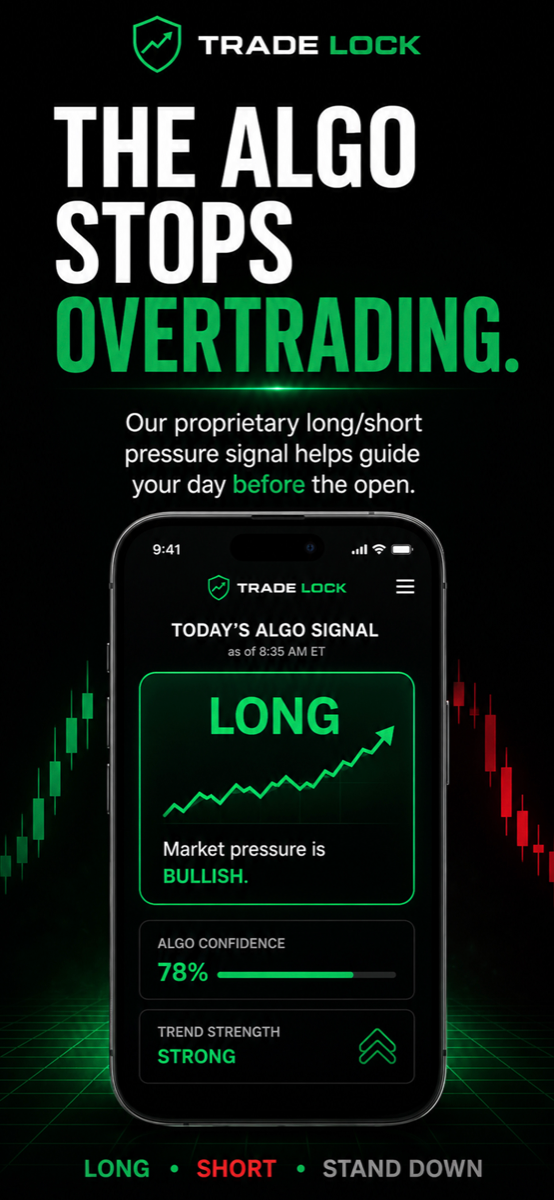
The indicator tells you the direction. The app makes sure you obey it.

Trade Lock takes the same momentum read and puts it on your phone every morning as one word: LONG, SHORT, or STAND DOWN. No chart needed.

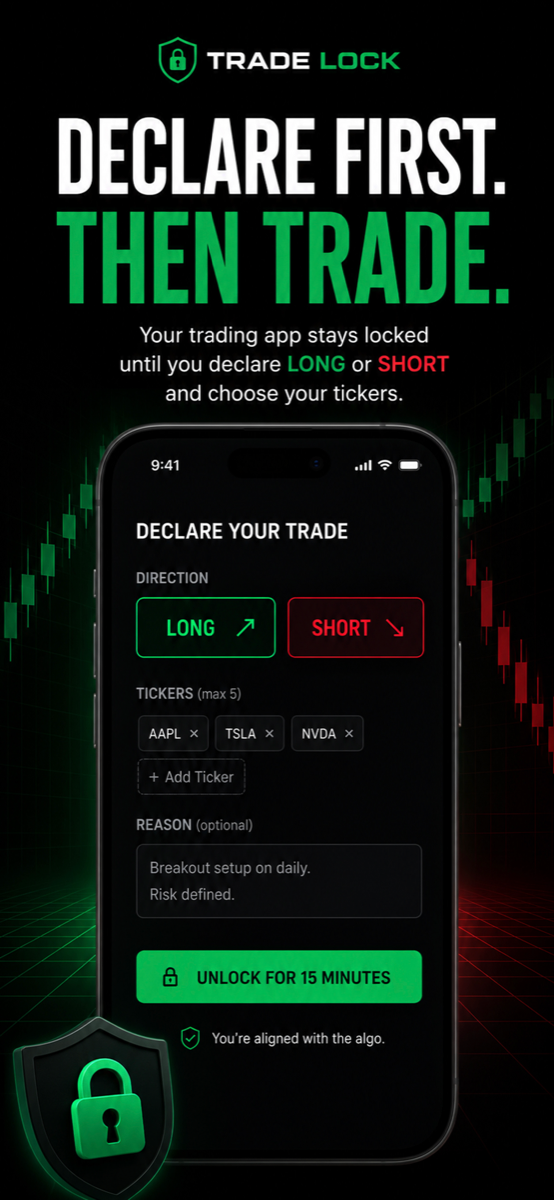
Then it locks your brokerage app behind Apple Screen Time. To get in, you declare your move first: long or short, and which tickers. Trade with the signal and you get a 15-minute window. Trade against it and you have to override on record. No plan? It stays locked.

  • Daily signal on your home screenSame model, no TradingView required.
  • Hard lock on your brokerRobinhood, Webull, whatever you use. Screen Time does the enforcing, not your willpower.
  • Declare-first unlock, then auto re-lock15 minutes to execute, then the shield snaps back.
  • Private log of every overrideSee exactly how often you fight the signal.
7 days free, then $5.99/month. Cancel anytime in the App Store.
Download on the App Store
Trade Lock app showing today's market bias Trade Lock app declare long or short screen

Stop donating money to traders who know which way the market is leaning.

Get the read. Trade one side. Sit out the chop.

Get Trade Lock Momentum · $29/mo
Cancel anytime · 30-day money-back on your first month
Get the indicator · $29/mo